
Trusted by the Best Across Industries


From Paper to Precision:
A Safer Way to Manage Permits
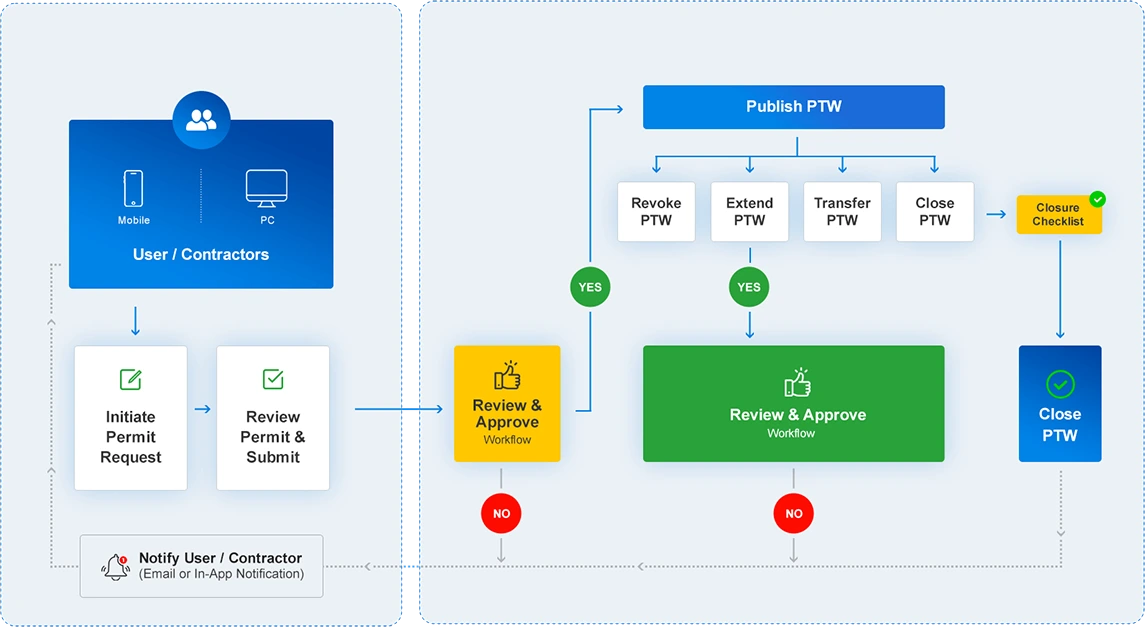
Managing high-risk activities is complex. Safetymint gives you the tools to standardise processes, eliminate manual delays, and ensure safe work starts only after proper clearance.

Request

Approve

Close
Key Capabilities at a Glance

Digital Permit Builder

Role-Based Workflows

Mobile & Tablet Friendly

Auto Notifications & Reminders

Integrated Risk Assessments

Approval Audit Trail

Permit Validity & Expiry Controls

Attachments & Evidence

Permit Status Dashboard

Contractor Access
Complying to Singapore MoM e-PTW Requirements
| MoM Requirements | Safetymint Compliance |
|---|---|
| The system must support the digital generation, submission, and processing of Permit-To-Work (PTW) without the need for paper-based documentation. | Supports full digital PTW processing without paper-based workflows. |
| The PTW system must capture essential information, including date, time, requester, assessor, approver, work location, job description, and attachments such as pictures. | Captures all required PTW details, including attachments and timestamps. |
| The system should allow the use of mobile device GPS to pinpoint and verify the location where the PTW is created, submitted, and approved to ensure on-site validation. | Uses GPS location tracking to verify on-site PTW activities. |
| Users must be able to configure automated workflows that manage processes like recording observations, submitting and verifying reports, and closing permits without skipping mandatory steps. | Enables workflow automation to streamline safety processes. |
| The system should ensure that only authorized personnel can access, review, and approve PTWs, with built-in safeguards to prevent falsification of records. | Implements role-based access control to prevent unauthorized approvals. |
| It must allow the capture of detailed information such as text inputs, timestamps, multiple images per inspection, comments, and user identity with a complete audit trail for investigations. | Records all PTW data with timestamps, comments, and audit logs. |
| The system must allow users to attach site drawings, supporting documents, and photos, and electronically route them to the authorized personnel for assessment and approval. | Allows document attachments and electronic routing for approvals. |
| A deadline must be assigned to each PTW, and the system should trigger automated notifications to supervisors when a permit is nearing expiration, based on predefined workflows. | Sends automated notifications before PTW expiry deadlines. |
| The authorized personnel should have the ability to revoke a PTW if the work is deemed unsafe or poses risks to health, safety, and welfare. | Includes revocation options for safety compliance. |
| The system must ensure that all information related to PTWs can be viewed, validated, and approved within the specified deadline. | Ensures timely validation and approval of PTWs. |
| A dashboard must be available to display the status of PTWs, including live, closed, and under-review permits, providing real-time visibility. | Provides a real-time dashboard for PTW tracking. |
| Each permit must be assigned a unique identification number to ensure proper tracking and record-keeping. | Assigns unique IDs for each PTW to enable traceability. |
| The default language of the PTW system must be English for universal accessibility and compliance with regulatory standards. | Supports English as the default language. |
| The application must be compatible with major mobile platforms such as Android and iOS and should work seamlessly with updated software versions. | Works across Android, iOS, and web browsers. |
| The system should be accessible over the internet and be capable of functioning offline, with real-time synchronization once a connection is re-established. | Accessible online and offline, with real-time data sync. |
| All PTW records must be retrievable upon request by regulatory agencies such as MOM officers during site inspections. | Allows quick retrieval of records for regulatory inspections. |
| The digital PTW should be convertible to a PDF format for printing and physical reference whenever necessary. | Supports PDF export and printing for documentation needs. |
| The PTW data should be downloadable in a structured format such as MS Excel to facilitate statistical analysis and reporting as required by agencies. | Facilitates structured data export in Excel for analysis. |
| Past PTW records must be stored and maintained for a minimum of five years from the creation date to comply with regulatory requirements. | Stores records for at least five years for compliance. |
| Once a PTW is approved and completed, the records must be locked and should not be modified to maintain data integrity. | Locks records post-approval to prevent edits and tampering. |
| The contractor must ensure that adequate training is provided to users of the PTW system, and all users must have compatible mobile devices for seamless operation. | Provides user training and support for seamless onboarding. |
Permit to Work Process Flow
From report to resolution - clear, consistent, and compliant.
Feature Highlights

Lockout/Tagout (LOTO)
Digitally manage LOTO procedures with clear steps, documentation, and approvals linked to each permit.

Isolation Management
Track and verify isolation points before work begins. Record isolations in real-time for audit readiness.

QR Code Integration
Scan permit-specific QR codes on-site to access status, documents, or close out work.

Map Plotting
Visualise work locations across your facility or site. Ideal for managing simultaneous jobs in large or complex areas.

Smart Workflows
Automate multi-level approvals and revalidation steps based on job type, risk, or location.

Multilingual Interface
Support a diverse workforce with a permit interface available in multiple languages.

Offline Access
Create and manage permits even without internet connectivity. Syncs automatically when back online.

Linked Documents & SOPs
Attach method statements, toolbox talks, and safe work procedures directly to each permit.

Digital Signatures
Capture secure, legally verifiable digital signatures from permit holders and approvers.
Analytics & Dashboards
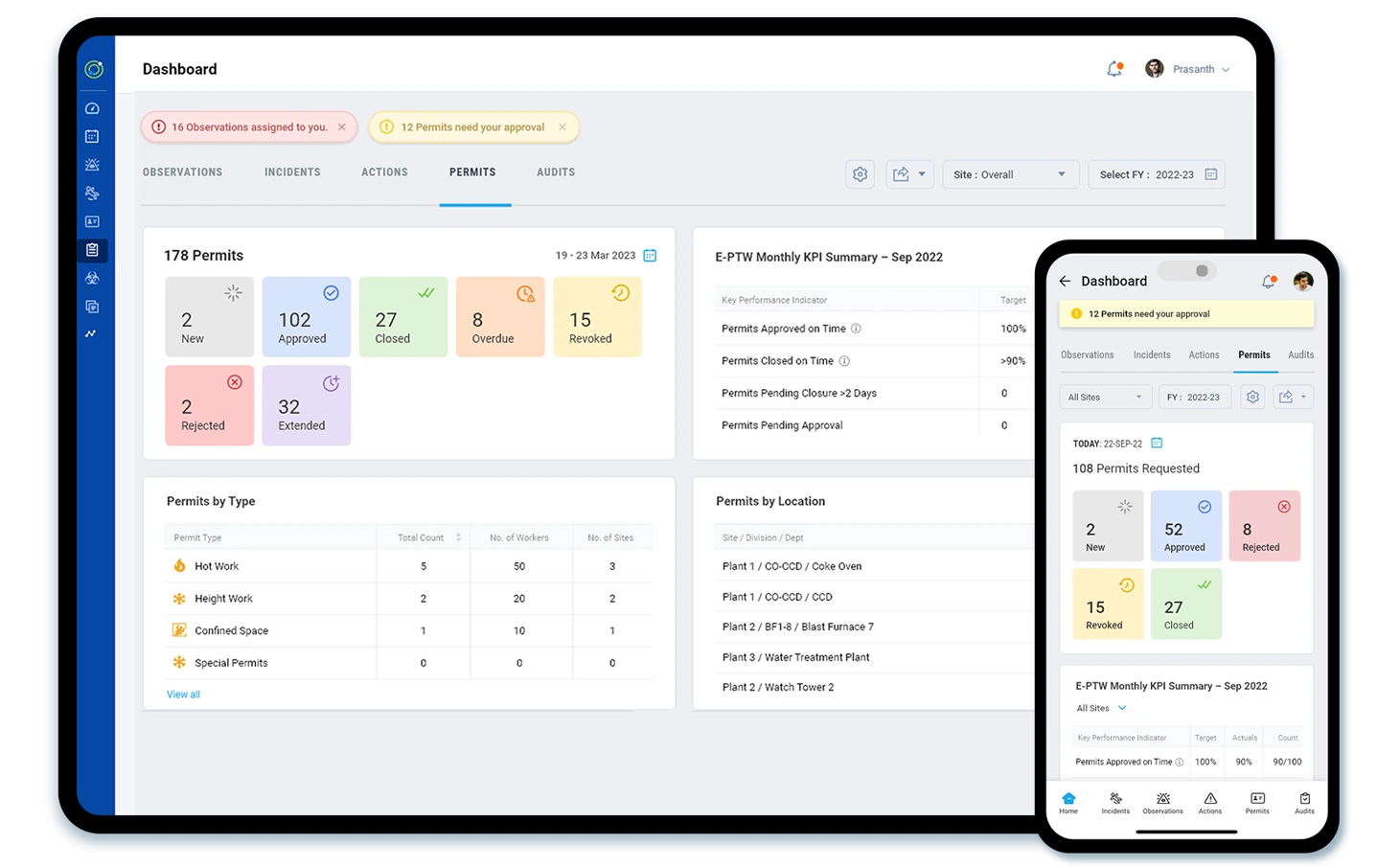
Get a live overview of your entire permit workflow - from active and overdue permits to approval rates and location-wise trends. Safetymint’s visual dashboards help safety teams spot issues, monitor performance, and stay ahead of delays.
- Permit Status Overview
- Monthly KPI Summary
- Permits by Location
- Permits by Type
- Permit Cards Dashboard
- Timeline Tracking
- Data-Driven Improvements

Why Safetymint for PTW Digitisation?
- End-to-end visibility across all permits, statuses, and sites
- Standardised processes tailored to your organisation’s safety policies
- Faster approvals without compromising compliance or control
- Mobile-ready and offline-enabled for field teams and remote locations
- Secure document tracking for isolations, LOTO, and risk assesments
- Multi-language support to accommodate diverse workforces
- Real-time dashboards to stay ahead of delays and bottlenecks
- Easy to deploy, simple to scale across sites or projects
Start simplifying your permit process today.
Digitise your work permits, reduce risk, and keep every jobsite safer and more compliant - with Safetymint.