A Safety Manager’s Guide to ISSOW Permit Management
If you’re managing safety in a high-risk environment, you’ve likely felt the pressure: multiple permits to track, isolations to coordinate, and risks to control, often across different systems. It’s time-consuming, error-prone, and honestly, outdated. More and more teams are now turning to digital tools to simplify the process and bring everything under one roof.
This post explores how a digital ISSOW can help streamline your permit management while making your job a little less reactive and a lot more effective.
What Is ISSOW Permit Management?

ISSOW stands for Integrated Safe System of Work. It brings together three core elements: Permit to Work, Risk Assessment, and Isolation Management into one connected system. Instead of juggling them separately, everything flows through a single, structured process that ensures the right checks happen at the right time.
If you’re working in oil and gas, mining, or any high-risk industry, you’ve probably seen how easily things can fall through the cracks, especially when permits and isolations live in different places. ISSOW helps fix that. It ties each permit to the associated risks and isolations so that nothing gets missed, even when multiple jobs overlap.
And when it’s digital, the benefits multiply. You get real-time visibility, automatic tracking, and fewer delays chasing approvals. More importantly, it gives you control so you can focus less on paperwork and more on keeping people safe.
Why It Matters for Safety Managers
Let’s be honest. Most paper-based systems or disconnected digital tools aren’t built for how safety managers actually work. You’re handling multiple job requests, fielding phone calls from supervisors, and trying to make sure no shortcuts are taken in the field.
A digital ISSOW system gives you:
- A clear view of all ongoing permits and jobs
- Automated checks for conflicting activities or missing isolations
- Instant access to risk assessments without digging through folders
- Confidence that every step is being logged and tracked
The goal isn’t just faster approvals. It’s about smarter, safer decisions made with fewer blind spots.
Key Features That Make a Difference
Here’s what you’ll want to look for in a digital ISSOW system that’s truly built for real-world safety needs:
1. Centralized Permit Control
Everything in one place. Electrical, hot work, confined space, and excavation permits are all managed within a single system.
2. Integrated Risk Assessment
Each permit connects directly to the relevant risk controls. If conditions change, you’re notified immediately.
3. Isolation Planning and Tracking
Plan isolations within the system, assign responsibilities, and track clearances before work begins.
4. Role-Based Access
Supervisors, contractors, and safety leads see only what they need to. This keeps the system clean and secure.
5. Audit Trail and History
Every action is logged. If you need to review why a permit was delayed or who approved a deviation, it’s all documented.
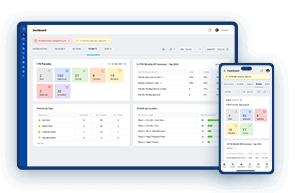
6. Dashboards for Oversight
Visual summaries show which jobs are live, which ones are overdue, and where follow-ups are pending.
A Day in the Life: ISSOW in Action

Picture this. You log in first thing in the morning and instantly see all active and scheduled permits for the day. A hot work job at Line 3 needs approval. You check the associated risk level. It’s high, but the system shows all isolations are in place and risk controls have been acknowledged by the site team.
Later in the day, an urgent excavation job is raised. Instead of back-and-forth calls, the request flows through the system. You get a mobile alert, review it between walkthroughs, and approve it with full visibility.
By the end of your shift, you’ve tracked progress, closed out completed jobs, and flagged one permit for missing documentation. No spreadsheets. No paper trails. Just a system that works the way it should.
Avoiding Common Pitfalls
Rolling out a digital ISSOW system is a big step, but it’s easy to stumble if you don’t plan right. Here are three mistakes to avoid:
-
Overcomplicating workflows
Keep it intuitive. If the process is too rigid or confusing, people will avoid using it. -
Skipping frontline training
The system is only as good as the people using it. Make sure everyone from supervisors to contractors knows how it works. -
Failing to review templates
Before switching systems, take time to update your permit types, risk matrices, and isolation procedures.
How to Choose the Right ISSOW Tool
Not all digital solutions are created equal. When evaluating ISSOW software, consider the following:
- Is it easy to use on both desktop and mobile?
- Can it handle multiple permit types and link them to isolations and risk controls?
- Does it support real-time notifications and reminders?
- Will it scale as your organization grows?
- Can it integrate with your maintenance or HR systems?
Also ask yourself whether the vendor understands your industry and is willing to adapt the platform to fit your workflows.
Final Thought
Permit management isn’t just a compliance requirement. It’s the foundation of a safe workplace. A digital ISSOW system gives you the structure, visibility, and control needed to stay ahead of risk. For safety managers, it’s not just about technology. It’s about building confidence in the process and peace of mind in the outcome.
This article was generated with the assistance of AI and reviewed by Ramesh Nair for accuracy and quality.